We know that both Abaqus-SwiftComp GUI and sgio can prepare the input file for SwiftComp using the inp file, but for now they cannot be used interchangeably because the format of generated sc file are different.
For example, the following workflow:
Use sgio to prepare sc file → Run SwiftComp (can be homogenization or dehomogenization) → Open homogenization or dehomogenization files using Abaqus-SwiftComp GUI
will throw this error:

To reproduce this error, you can use a simple 3D model attached below (Delete the .txt extension after downloading):
inp file:
Job-1.inp.txt (2.6 KB)
Run the following command to use sgio to prepare sc file:
python -m sgio convert Job-1.inp Job-1.sc -ff abaqus -tf swiftcomp -tfv 2.1 -m bm1 --sgdim 3
Then run SwiftComp using the following command:
swiftcomp Job-1.sc 1D H
Then open Abaqus-SwiftComp GUI and click on “Dehomogenization” and “OK.“ You will see this error:
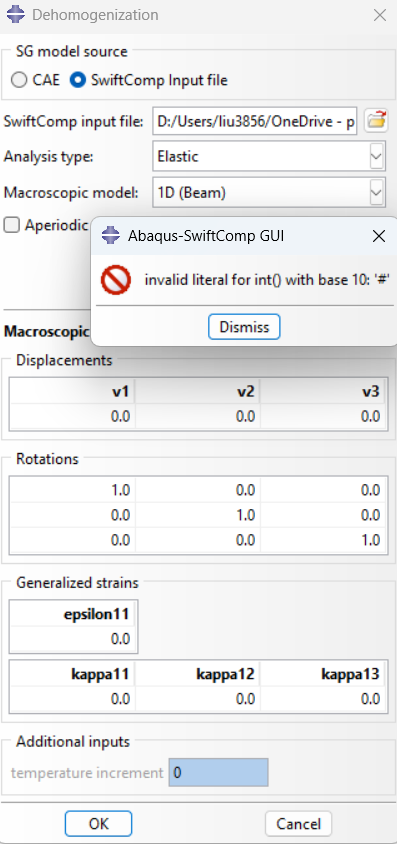
The error message means the plug in cannot turn “#” into an integer because the plug in is not supposed to parse “#.“
This is caused by difference in sc file generated by Abaqus-SwiftComp GUI and sgio:
Abaqus-SwiftComp GUI: sc file does not contain comments
sgio: sc file contains comments like this
1 1 10 11 14 13 1 2 5 4 0 0 0 0 0 0 0 0 0 0 0 0 # element connectivity
The “#“ at the end caused the error. For a temporary fix, simply delete “# element connectivity“