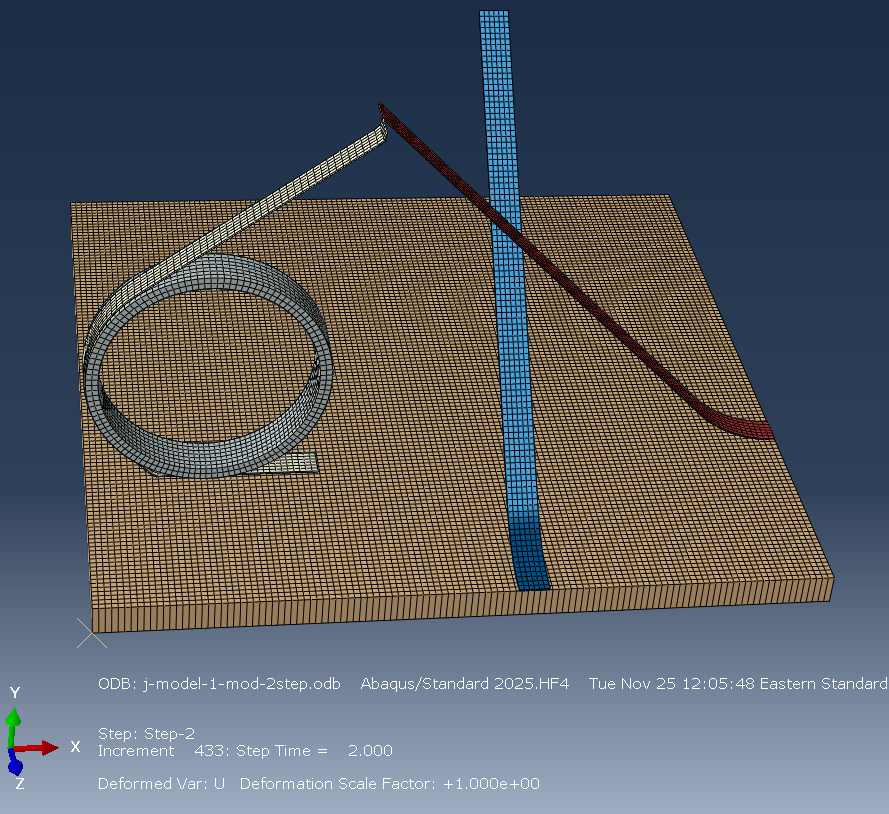
hi, Ahmed,
I try to attach the modified inp file that runs for the 1st 2 steps. However, it does not allow me to do it, since it is not an authorized format. Is that any way to upload a text file?
I put the keywords and definitions below:
** INTERACTIONS
**
** Interaction: General
*Contact
*Contact Inclusions, ALL EXTERIOR
*Contact Property Assignment
, , Normal
Tool , Prepreg-Down , Cohesive
Tool , Prepreg-Down-2 , Cohesive
Tool , Prepreg-Down-3 , Cohesive
Prepreg-Down-3 , Prepreg-Up , Cohesive
Prepreg-Down-3 , Prepreg-Up-2 , Cohesive
*Surface Property Assignment, property=GEOMETRIC CORRECTION
_General_gcs0_3, Circumferential, -2.11636e-16, 0.02, -0.0025, -2.11636e-16, 0.02, 0.9975
_General_gcs0_6, Circumferential, -2.11636e-16, 0.02, -0.0025, -2.11636e-16, 0.02, 0.9975
_General_gcs0_9, Circumferential, -2.11636e-16, 0.02, -0.0025, -2.11636e-16, 0.02, 0.9975
_General_gcs0_11, Circumferential, -2.11636e-16, 0.02, -0.0025, -2.11636e-16, 0.02, 0.9975
_General_gcs0_30, Circumferential, -2.6942e-07, 0.02, -0.0075, -2.6942e-07, 0.02, 0.9925
_General_gcs0_33, Circumferential, -2.6942e-07, 0.02, -0.0075, -2.6942e-07, 0.02, 0.9925
_General_gcs0_36, Circumferential, -2.6942e-07, 0.02, -0.0075, -2.6942e-07, 0.02, 0.9925
_General_gcs0_38, Circumferential, -2.6942e-07, 0.02, -0.0075, -2.6942e-07, 0.02, 0.9925
_General_gcs0_45, Circumferential, -0.0475, 0.02, 0.0349997, -1.0475, 0.02, 0.0349997
_General_gcs0_48, Circumferential, -0.0475, 0.02, 0.0349997, -1.0475, 0.02, 0.0349997
_General_gcs0_51, Circumferential, -0.0475, 0.02, 0.0349997, -1.0475, 0.02, 0.0349997
_General_gcs0_53, Circumferential, -0.0475, 0.02, 0.0349997, -1.0475, 0.02, 0.0349997
_General_gcs0_58, Circumferential, 0., 0.021, -0.0035, 0., 0.021, 0.9965
_General_gcs0_59, Circumferential, 0., 0.021, -0.0035, 0., 0.021, 0.9965
** ----------------------------------------------------------------
**
** STEP: Step-1
**
*Step, name=Step-1, nlgeom=YES, inc=10000
*Coupled Temperature-displacement, creep=none, deltmx=1.
0.1, 0.1, 1e-50, 0.1
**
** BOUNDARY CONDITIONS
**
** Name: BC-RP-1 Type: Symmetry/Antisymmetry/Encastre
*Boundary, op=NEW
Set-RP-1, ENCASTRE
** Name: BC-RP-4 Type: Symmetry/Antisymmetry/Encastre
*Boundary, op=NEW
Set-RP-4, ENCASTRE
** Name: BC-RP-6 Type: Symmetry/Antisymmetry/Encastre
*Boundary, op=NEW
Set-RP-6, ENCASTRE
** Name: Roller_Fix-1 Type: Displacement/Rotation
*Boundary, op=NEW
** Name: Roller_Velocity-1 Type: Velocity/Angular velocity
*Boundary, op=NEW, type=VELOCITY
_PickedSet867, 1, 1
_PickedSet867, 2, 2, -0.01
_PickedSet867, 3, 3
_PickedSet867, 4, 4
_PickedSet867, 5, 5
_PickedSet867, 6, 6
** Name: Tool-Fix Type: Symmetry/Antisymmetry/Encastre
*Boundary, op=NEW
_PickedSet761, ENCASTRE
**
** INTERACTIONS
**
** Interaction: General
*Contact
*Contact Inclusions
Tool , Prepreg-All
Roller , Prepreg-Up
*Contact Exclusions
, Prepreg-All-2
, Prepreg-All-3
**
** OUTPUT REQUESTS
**
*Restart, write, frequency=0
**
** FIELD OUTPUT: F-Output-1
**
*Output, field, frequency=2
*Node Output, variable=PRESELECT
*Element Output, directions=YES, variable=PRESELECT
*Contact Output
CDISP, CSDMG, CSQUADSCRT, CSTRESS
**
** HISTORY OUTPUT: H-Output-1
**
*Output, history, variable=PRESELECT
*End Step
** ----------------------------------------------------------------
**
** STEP: Step-2
**
*Step, name=Step-2, nlgeom=YES, inc=10000
*Coupled Temperature-displacement, creep=none, deltmx=1.
0.001, 2., 1e-50, 2.
**
** BOUNDARY CONDITIONS
**
** Name: Roller_Velocity-1 Type: Velocity/Angular velocity
*Boundary, type=VELOCITY
_PickedSet867, 1, 1, -0.05
_PickedSet867, 2, 2
_PickedSet867, 6, 6, 2.5
**
** LOADS
**
** Name: Prepreg-1-Tension Type: Concentrated force
*Cload, follower
_PickedSet779, 3, -10.
** Name: Roller consilidation force Type: Concentrated force
*Cload
_PickedSet863, 2, -100.
**
** CONTROLS
**
*Controls, reset
*Controls, parameters=time incrementation
, , , , , , , 20, , ,
**
** OUTPUT REQUESTS
**
*Restart, write, frequency=0
**
** FIELD OUTPUT: F-Output-1
**
*Output, field, frequency=2
*Node Output, variable=PRESELECT
*Element Output, directions=YES, variable=PRESELECT
*Contact Output
CDISP, CSDMG, CSQUADSCRT, CSTRESS
**
** HISTORY OUTPUT: H-Output-1
**
*Output, history, variable=PRESELECT
*End Step
Regards, Kunming